Contributing to the distribution documentation
What is the documentation for?
The iGEM distribution documentation (docs) is a set of pages that serves to both explain things to new users/contributors to the distribution and also serve as a point of reference and ‘single source of truth’ for those who are already using/contributing. As such, we see anything that anyone doesn’t understand about the distribution, or any standard procedure that isn’t written down, as a ‘bug’ in our documentation, no matter how small. In fact, the smaller it is the more likely it is that other people have the same question! We therefore welcome any contributionso the documentation, in the first instance by raising an issue with ‘documentation’ and ‘enhancement’/’bug’ tags but then, if possible, by working with us to improve the docs.
How to contribute
Contribute to the docs using the same workflow that you would use for contributing anything to the distribution (see Getting started with Github). Create a new branch in the main repo or in a fork, make your changes to the corresponding (probably .rst) file, commit, push, open a pull request.
Remember, the documentation is just text, so please don’t be put off contributing because you don’t know how to use reStructuredText or GitHub etc.! If you are struggling with any aspect just open an issue on GitHub or contact an engineering committee member and they can hep you. Contributing can be as simple as submitting a Google doc or a Slack message with text and we can help to put it into the docs.
Seeing what it looks like
In order to see what the site will look like with your changes, you’ll either need to see them at the RTD site or build the distribution locally.
Conventions for editing
To make it easier to compare different versions of the documentation, please write each sentence of content on a separate line. A paragraph break will only be inserted if you leave a blank line.
How to actually write RST files
For a good example page with the various things that you can include in RTD see this page.
You can also view the source code for any page on the docs by clicking Edit on GitHub at the top of the page and then clicking Raw.
For a more thorough guide to writing in reStructuredText see here.
How the distribution documentation works
The building and hosting of the documentation is carried out by Read the Docs (RTD).
The documentation is built from the source .rst files in the docs directory using Sphinx to generate HTML files and then is hosted at https://igem-distribution.readthedocs.io/en/latest/.
For more information on how this building happens see How to build the distribution locally for testing.
RTD uses webhooks to automatically build the documentation when a pull request is opened to develop and then when new commits are pushed to the branch while this pull request is open.
The status of the build on RTD will be displayed along with other tests on the pull request:
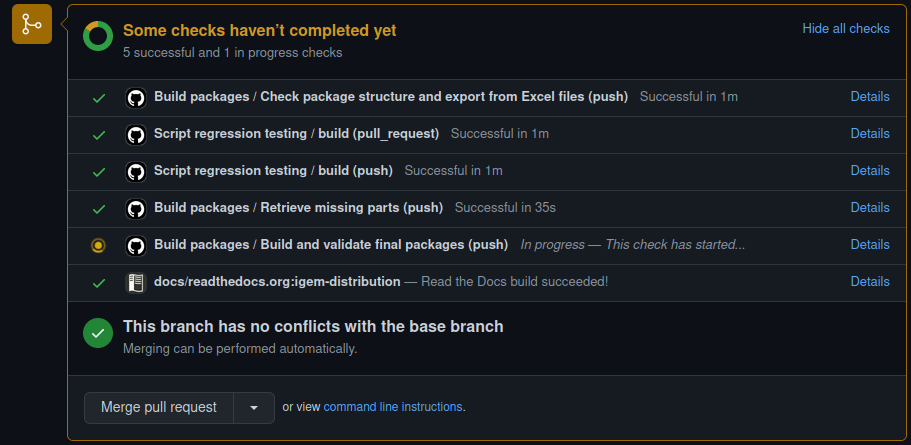
Should this not happen, you can check the status of recent builds at the RTD site here. Until the pull request is merged into develop, the site will not be activated on RTD, but with admin access one can activate it in the versions tab and then access it by going to https://igem-distribution.readthedocs.io/en/[BRANCH_NAME]/. You should make sure this is ‘hidden’ when activated so that it doesn’t show up in the versions tab for visitors to the site and cause confusion. After the pull request is merged into develop, the default documentation site will be updated. We don’t currently have any releases on main, so the only version is latest, this page will need updating at the point when there is.